Manual Configuration To set up your 20i mailbox on an Apple iPhone or iPad, you need to: Head to the Settings icon and locate the Accounts & Passwords option.
Then select 'Add Account'. Select Other from this list.
Select Add Mail Account. Input the information requested:
Name: Anything eg Jane Smith or email address Email: jane.smith@yourdomain.com Password: Mailbox Password Description: Work, Business...etc or email address IMAP: Incoming Mail Server
Outgoing Mail Server Settings Host Name: smtp.stackmail.com Username: jane.smith@yourdomain.com Password: Mailbox Password
Outgoing Port numbers
587 with SSL OFF
OR 465 with SSL Set to ON
Norton Browser Extensions
How to Add Safe web browser extention
Step 1 Click up arrow and then yellow Norton symbol at bottom right near time
Step 2 Click Intsall on Browser Extensions
Step 3 Scroll down to Safe Web
Note I generally only install Norton Safe Web, but depending on how you want to use them you can add all the others if you want.
Note
I generally only install Norton Safe Web but you can add all or choose what you want but my preference is only Norton Safe Web, also you will need to do this for each browser if you add multiple
Microsoft Edge
Chrome
Firefox
Step 4 Click Blue Get Button
Step 6 Click Add extension
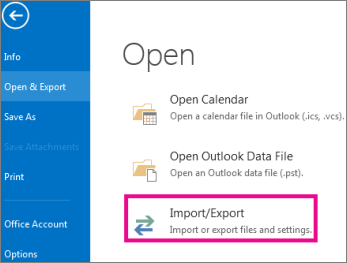
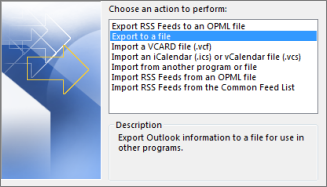
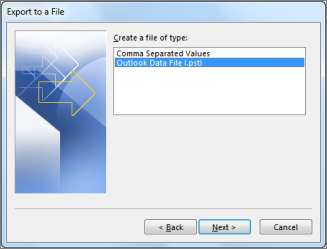
Back up your Outlook email
If you are using email for work, you are most likely using an Exchange or IMAP account. Exchange and IMAP servers automatically archive your email so that you can access it anytime or anywhere. If you have an Exchange account, check with your admin about how to access your archived email.
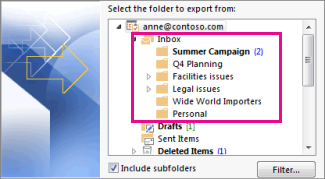
Select the mail folder you want to back up and select Next.
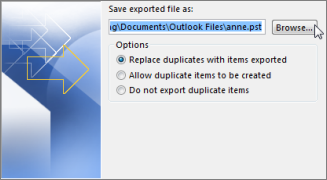
Choose a location and name for your backup file, and then select Finish.
If you want to ensure no one has access to your files, enter and confirm a password, and then select OK.
The messages that you keep in a .pst file are no different from other messages. You can forward, reply, or search through the stored messages as you do with other messages.
Advantage Civil Engineering Supplies Ltd
New Customer, We provide full IT support and Website and email hosting and revamped there website
Advantage Civil Engineering Supplies Ltd deliver quality building materials on time, at competitive prices, with friendly and professional personal customer service as standard.
GB Trophies Website
Created new website for GB Trophies in Great Moor Stockport Click here to view Small Business website for trophy retailer.
Welcome to the probably the best trophy shop in the north west, we have an amazing collection of trophies for sale, we also provide rotary and laser engraving service, including engraving your own items to engrave.
We have a trophy or an awards for all occasions and pride ourselves in providing great quality service.
Stockport Advocacy Website
New Website for Stockport Advocacy over 30 pages with with contact form and and referal forms and downloads, Blog and News Pages, NSH and Mental Health pages and a community section
Stockport Advocacy has been operating and supporting people since 2004. We are a Community Benefits Society with a team of experienced and qualified advocates working across the Metropolitan Borough of Stockport.